
Anthropic makes Claude, one of the most capable AI models available. Getting an API key takes a few minutes, but unlike some other providers, you'll need a credit card.
What you need before getting started
You need:
- An email address
- A credit card (required to activate API access)
There's no free API tier with Anthropic. The free Claude.ai plan gives you access to Claude in the browser, but API access requires adding billing information and making a minimum $5 deposit to reach Tier 1. You start getting charged the moment you make API calls.
If a credit card upfront is a dealbreaker, Mistral's Experiment plan lets you get an API key with just a phone number. But if you want Claude specifically, this is the only path.
How to generate your Anthropic API key (step by step)
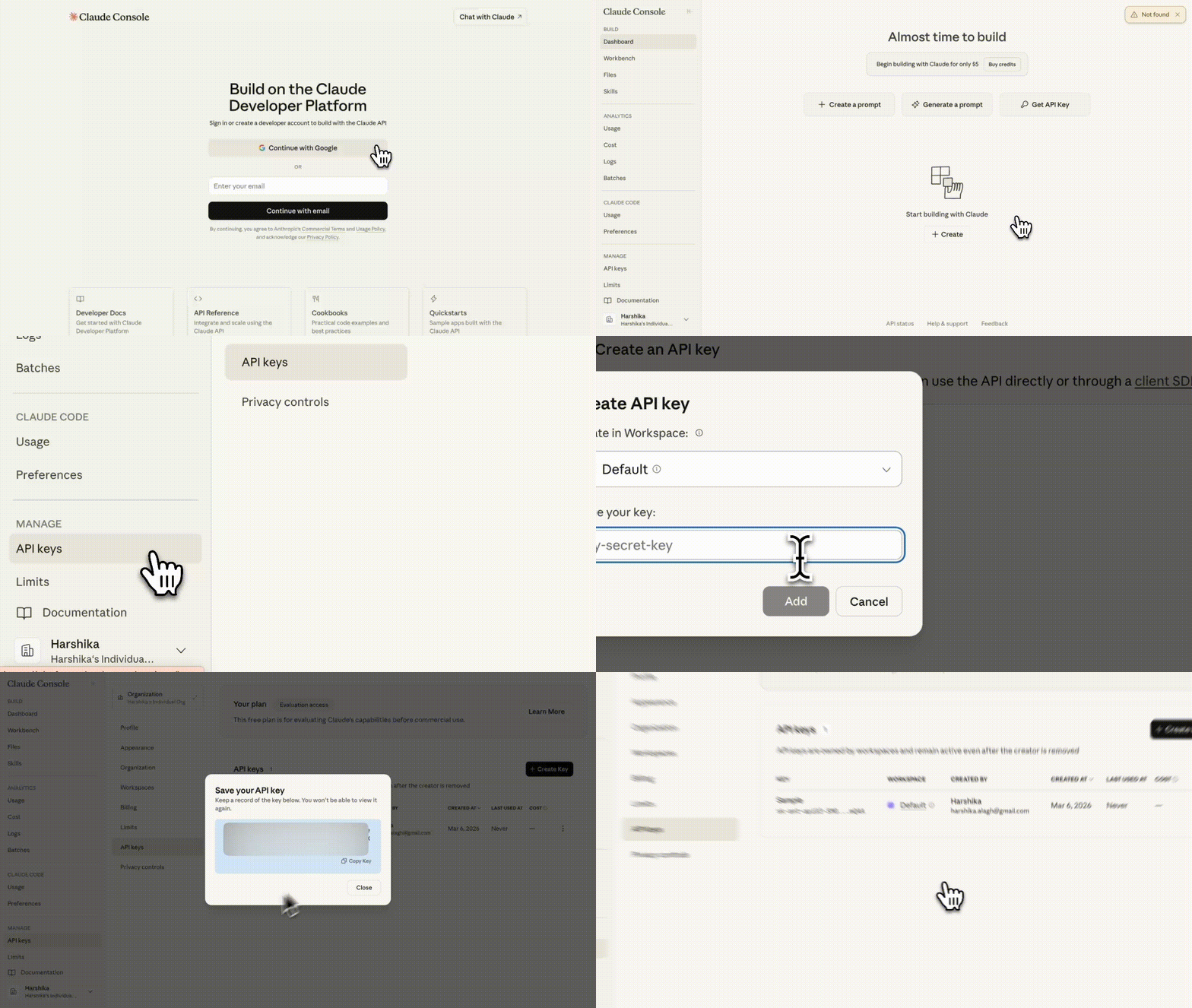
- Go to console.anthropic.com and create an account
- Navigate to Billing and add a credit card
- Make a minimum $5 deposit to activate Tier 1 API access
- Navigate to API Keys in the left sidebar
- Click Create Key, give it a name, and confirm
- Copy the key immediately and store it somewhere safe. Anthropic won't show it again
Anthropic API rate limits explained
Anthropic uses a tiered system. When you start, you're on Tier 1. Your limits go up as you spend more.
| Tier | Deposit Required | Monthly Spend Cap |
|---|---|---|
| Tier 1 | $5 | $100 |
| Tier 2 | $40 | $500 |
| Tier 3 | $200 | $1,000 |
| Tier 4 | $400 | $5,000 |
On Tier 1, you get 50 requests per minute. The bigger constraint is tokens per minute, which varies by model but is conservative enough that you'll feel it if you're running batches or parallel requests.
The tier system exists to prevent runaway spend, which is actually useful early on. But it means you can't just get a key and immediately throw heavy workloads at it. If you hit your monthly spend cap before the month ends, you wait until the next calendar month.
Hitting a rate limit returns a 429 error with a retry-after header telling you how long to wait.
Anthropic API pricing: how much does it cost
Anthropic charges per million tokens, counting both input and output separately.
| Model | Input | Output |
|---|---|---|
| Claude Haiku 4.5 | $1 / M tokens | $5 / M tokens |
| Claude Sonnet 4.6 | $3 / M tokens | $15 / M tokens |
| Claude Opus 4.6 | $5 / M tokens | $25 / M tokens |
Output tokens cost significantly more than input, so prompts that generate long responses add up faster than prompts that ask for short ones. Keep that in mind when designing your calls.
There's no subscription fee on the API side. You pay for what you use, and unused credits roll over.
Batch processing gets a 50% discount if you don't need an immediate response.
Which Claude model should you use
If you're not sure, use claude-haiku-4-5.
It's the fastest and cheapest model in the Claude 4 family. For most text-based tasks, the quality is strong. At $1 per million input tokens, it's also cheap enough that you won't think twice about using it.
Step up to claude-sonnet-4-6 if you need stronger reasoning, more nuanced output, or you're handling complex multi-step tasks. It's three times the price of Haiku but still well within reasonable range for most use cases.
claude-opus-4-6 is the most capable model Anthropic offers. It's also $5 per million input tokens, which adds up quickly. Unless you specifically need frontier-level reasoning, Haiku or Sonnet will handle the job.
How to use your Anthropic API key in your project
Set it as an environment variable so it never gets hardcoded into your source files:
export ANTHROPIC_API_KEY="your-key-here"
To make this persist across terminal sessions, add that line to your ~/.bashrc or ~/.zshrc.
Test it with a curl call:
curl https://api.anthropic.com/v1/messages \
  -H "x-api-key: $ANTHROPIC_API_KEY" \
  -H "anthropic-version: 2023-06-01" \
  -H "Content-Type: application/json" \
  -d '{
    "model": "claude-haiku-4-5-20251001",
    "max_tokens": 100,
    "messages": [{"role": "user", "content": "Hello"}]
  }'
Note that Anthropic's API uses x-api-key as the auth header, not Authorization: Bearer like most other providers. If you're coming from OpenAI or Mistral, you'll probably get a 401 the first time because of this.
If you get a JSON response with a content array back, the key is working. A 401 means the key isn't set correctly. A 403 means billing isn't activated yet.
For Python projects, use python-dotenv to load your key from a .env file:
from dotenv import load_dotenv
import os

load_dotenv()
api_key = os.getenv("ANTHROPIC_API_KEY")
How to keep your Anthropic API key secure
Never paste your API key into code you commit to a repository. Leaked Anthropic keys are a real risk because they're tied directly to billing. Someone finding your key in a public repo can rack up charges in minutes.
If it gets exposed, go to the console immediately, delete the key, and generate a new one. Then check your usage page for any calls you didn't make.
Keep your key in a .env file at the project root and add .env to your .gitignore.
For CI pipelines and server deployments, use your platform's secrets manager rather than a .env file. GitHub Actions, Railway, Render, and most platforms have one built in.
Use your Anthropic API key in Char for AI meeting notes that stay on your device
Getting your own API key is a deliberate choice. Most people just let tools handle it for them. If you went through this, you probably care about what happens to your data too. That's exactly what Char is built for.
Char is a free, open-source AI notepad for meetings. You record a meeting, Char captures the audio directly from your system with no bot joining the call and no calendar permissions required, and generates a live transcript while you take notes. When the meeting ends, you hit summarize, and Char sends your notes and transcript to Claude and returns a structured summary.
Everything else stays local. The audio file, the transcript, the summary are all saved on your device, not on Char's servers. Char doesn't have servers storing your conversations. There's nothing to breach, no vendor to trust with your data.
Char is free to use with your own API keys. The free plan covers transcription, summaries, chat, templates, and local storage. There's a paid plan for people who want cloud services and don't want to manage keys, but if you're reading this, that's probably not you.
The workflow is simple: record, transcribe locally, summarize with your own Anthropic key. You choose which Claude model runs. You can swap to Mistral, OpenAI, or a local Ollama model any time without losing your files or your history.
To connect Anthropic, open Char's settings, go to API Keys, paste your key, and select claude-haiku-4-5-20251001 to start.
